Is an AI receptionist worth it? A break-even test by trade
Is an AI receptionist worth it? A break-even test with worked examples for HVAC, plumbing, roofing, dental and med spa, real listed costs and a 30-day trial plan.
The short answer
An AI receptionist is worth it when the profit from the jobs it saves each month is bigger than its total monthly cost. Divide that cost by the profit on an average job to find how many saved jobs you need. If your call log shows it can win back more jobs than that, it pays. If you rarely miss calls, it probably doesn't.
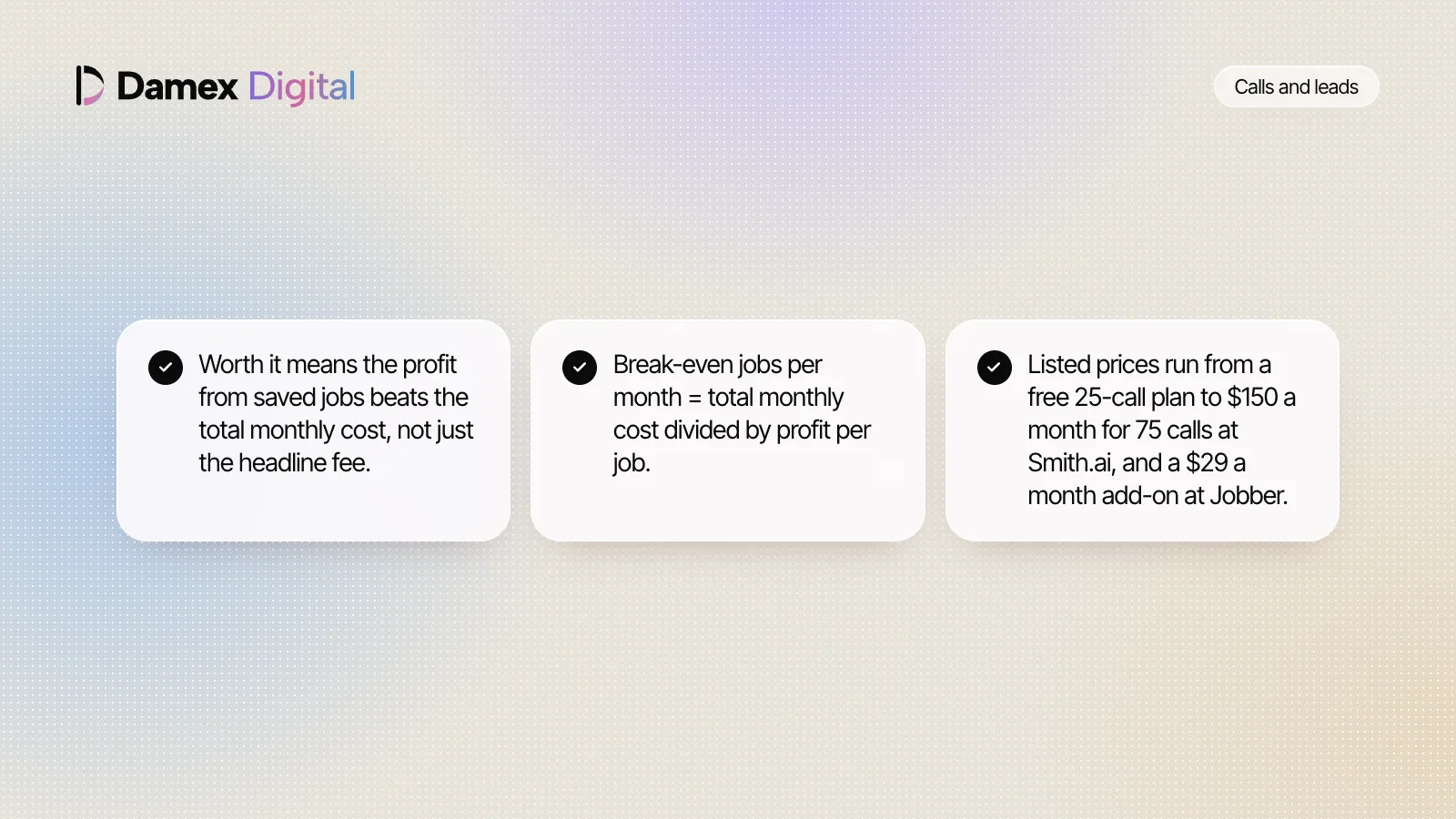
- Worth it means the profit from saved jobs beats the total monthly cost, not just the headline fee.
- Break-even jobs per month = total monthly cost divided by profit per job.
- Listed prices run from a free 25-call plan to $150 a month for 75 calls at Smith.ai, and a $29 a month add-on at Jobber.
- In a 2026 Gartner survey, 87% of customers said companies using generative AI must offer a way to reach a person.
- Count missed calls for two weeks, then run a 30-day trial against your break-even number.
On this page 14 sections
- 01What is an AI receptionist, and what does worth it mean?
- 02Why is the question worth asking now?
- 03How much does an AI receptionist cost per month?
- 04How do you work out if an AI receptionist is worth it?
- 05Is an AI receptionist worth it for an HVAC company? A worked example
- 06How does this work for each trade?
- 07What can an AI receptionist do, and what can’t it?
- 08Will callers actually talk to an AI receptionist?
- 09What hidden costs and setup time should you plan for?
- 10What about patient privacy for dental and health practices?
- 11When is an AI receptionist worth it, and when isn’t it?
- 12How do you test an AI receptionist for 30 days?
- 13What are the most common mistakes when deciding?
- 14How does Damex handle calls and missed calls?
Tuesday, a quarter past eleven. Both your techs are on jobs, you’re on a roof measuring for a quote, and your phone buzzes twice in your pocket. By lunch there are three missed calls and one voicemail. You call the other two back at 1 p.m. One doesn’t pick up. The other has already booked someone.
So is an AI receptionist worth it for a business like yours? It comes down to a few numbers you can find yourself: what you miss, what a job leaves you after costs, and what the tool really costs each month. This guide gives you the test, worked Examples for five trades, and a 30-day trial plan.
Key takeaways
- An AI receptionist is worth it when the profit from jobs it saves beats its total monthly cost.
- Break-even jobs per month = total monthly cost divided by profit per job. Use profit, not revenue.
- Your two-week missed-call count matters more than any vendor's sales page.
- Per-call plans charge for spam and existing customers too, so price your real call volume.
- Callers are more willing to use AI when a person is easy to reach. In a 2026 Gartner survey, 87% said that option is essential.
- Health practices that are HIPAA covered entities need a business associate agreement before patient details flow.
What is an AI receptionist, and what does worth it mean?
An AI receptionist is software that answers your business phone, replies from answers you give it, books or takes requests, and passes unusual calls to a person. Worth it means one thing here. The profit from the jobs it saves each month is bigger than everything it costs you each month.
A few terms used through this guide:
- AI receptionist. Also sold as an AI phone receptionist or AI voice receptionist. It talks to callers in a synthetic voice and follows your rules.
- Missed-call text-back. A text sent automatically to anyone whose call you miss. Some AI receptionists include it.
- Saved job. A booked job from a caller who would otherwise have gone to a competitor. Not every answered call is a saved job.
- Profit per job. What a typical job leaves you after parts and labor. As an example, a $400 job that leaves you $150 counts as $150 here.
- Break-even. The number of saved jobs a month that exactly covers the total cost.
The useful question is never “is AI worth it” in general. It’s whether this tool, at this price, wins back enough of your own lost calls.
Why is the question worth asking now?
It’s worth asking now because AI receptionists are sold at prices a two-truck business can test, and customers are getting used to AI doing tasks for them. Vendors list plans from free to a few hundred dollars a month, and field service software sells them as add-ons. A badly set-up one costs you callers.
$0
is Smith.ai's listed price for its free AI receptionist plan, which covers 25 calls a month and then charges $3.00 a call. Its Pro plan is $150 a month for 75 calls.
$29
a month is the price Jobber lists for its Receptionist add-on, which it says covers calls and texts 24/7 on top of a Jobber plan.
Source: Jobber pricing
$18.27
an hour was the median wage for receptionists in May 2025, or $38,010 a year, before payroll taxes and benefits.
Source: U.S. Bureau of Labor Statistics
58%
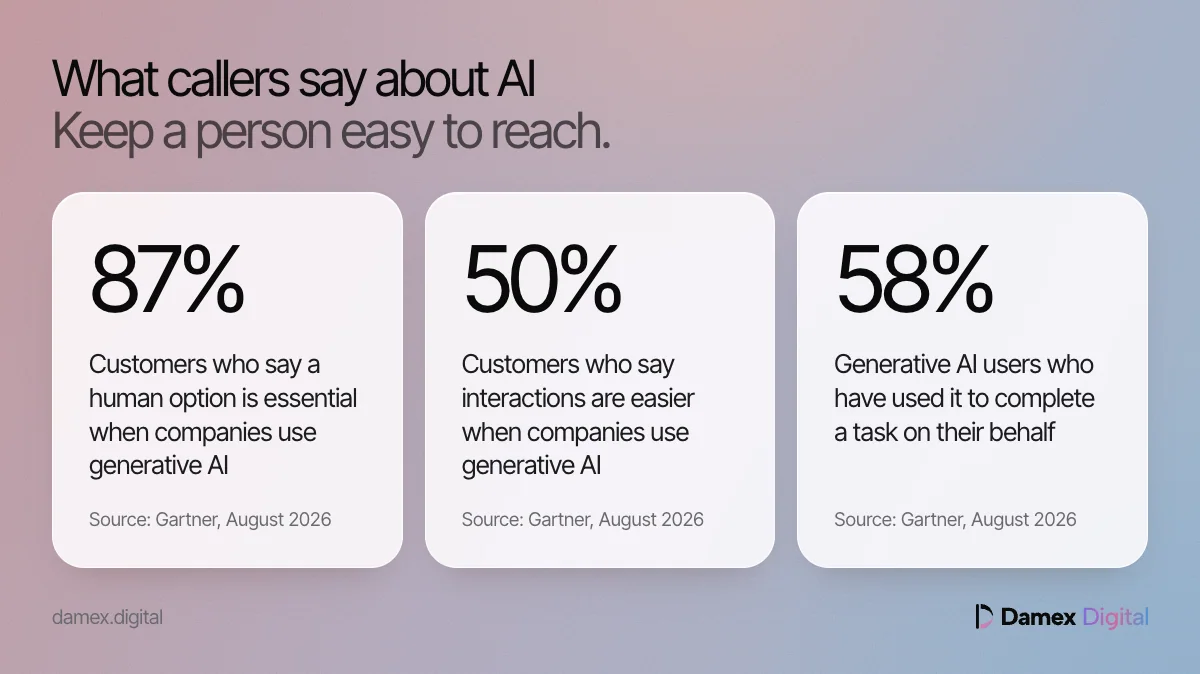
of customers who use generative AI have used it to complete a task on their behalf, in a Gartner survey of 3,566 customers in February and March 2026.
Source: Gartner, August 2026
Gartner says customers increasingly expect AI to help them take action, such as booking an appointment. That’s the job an AI receptionist does for a service business. For the wider case on why unanswered calls cost so much, read missed calls are the cheapest leads you are losing.
How much does an AI receptionist cost per month?
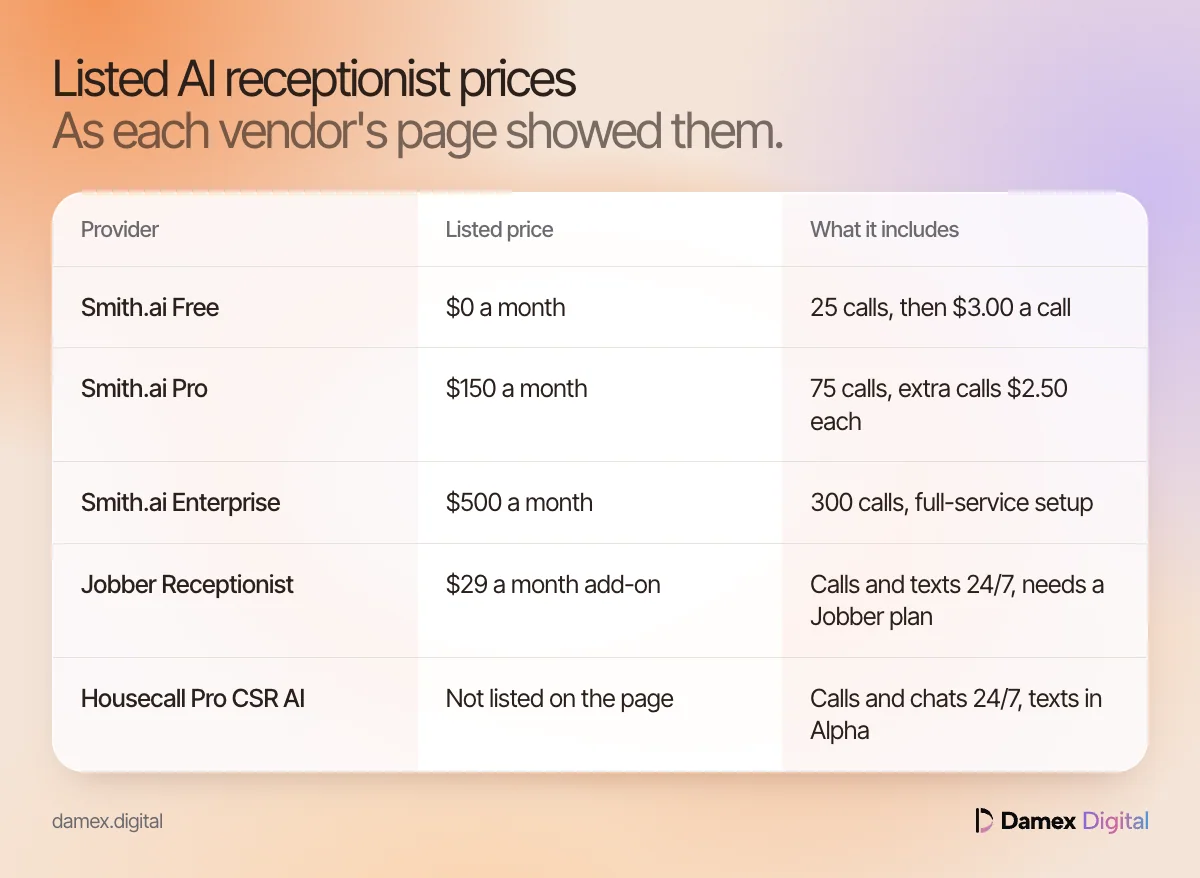
AI receptionist pricing runs from free to about $500 a month on the vendors’ own pages, and the way each one counts usage matters more than the headline. Smith.ai charges per call, Jobber sells a flat add-on to its software, and Housecall Pro’s CSR AI page lists no price at all. Here is what each page showed when we checked.
| Provider | Listed price | What it includes | Watch for |
|---|---|---|---|
| Smith.ai Free | $0 a month | 25 calls, then $3.00 a call | Every answered call counts by default |
| Smith.ai Pro | $150 a month | 75 calls, extra calls $2.50 each | Dedicated onboarding setup |
| Smith.ai Enterprise | $500 a month | 300 calls, full-service setup | Month-to-month, 30 days’ notice to cancel |
| Jobber Receptionist | $29 a month add-on | Calls and texts 24/7 | Needs a Jobber plan; no call cap stated |
| Housecall Pro CSR AI | Not listed on the page | Calls and chats 24/7, texts in Alpha | Ask for the price in writing |
| Damex | See pricing | Answers calls, texts back missed ones | Per location |
These are listed prices, not quotes, and they change. Smith.ai’s figures come from an archived copy of its pricing page dated October 22, 2026, because the live page wouldn’t load on our network. For how this fee sits next to ads, SEO and tools, see what local marketing costs, line by line.
What is the cheapest AI receptionist?
The cheapest listed plan we found is Smith.ai’s free tier at $0 for 25 calls a month. For a small business with more calls, the cheapest month depends on volume. At 75 calls, the free plan costs $150 (50 extra calls × $3.00), the same as Pro. Above that, Pro is cheaper per call.
Is there a free trial?
Yes, in several forms. Smith.ai lists a free plan and a “Quality Studio” for test calls before going live. Jobber’s pricing page offers 14 days of its Grow plan with no card required. Housecall Pro offers a free trial of CSR AI.
How do you work out if an AI receptionist is worth it?
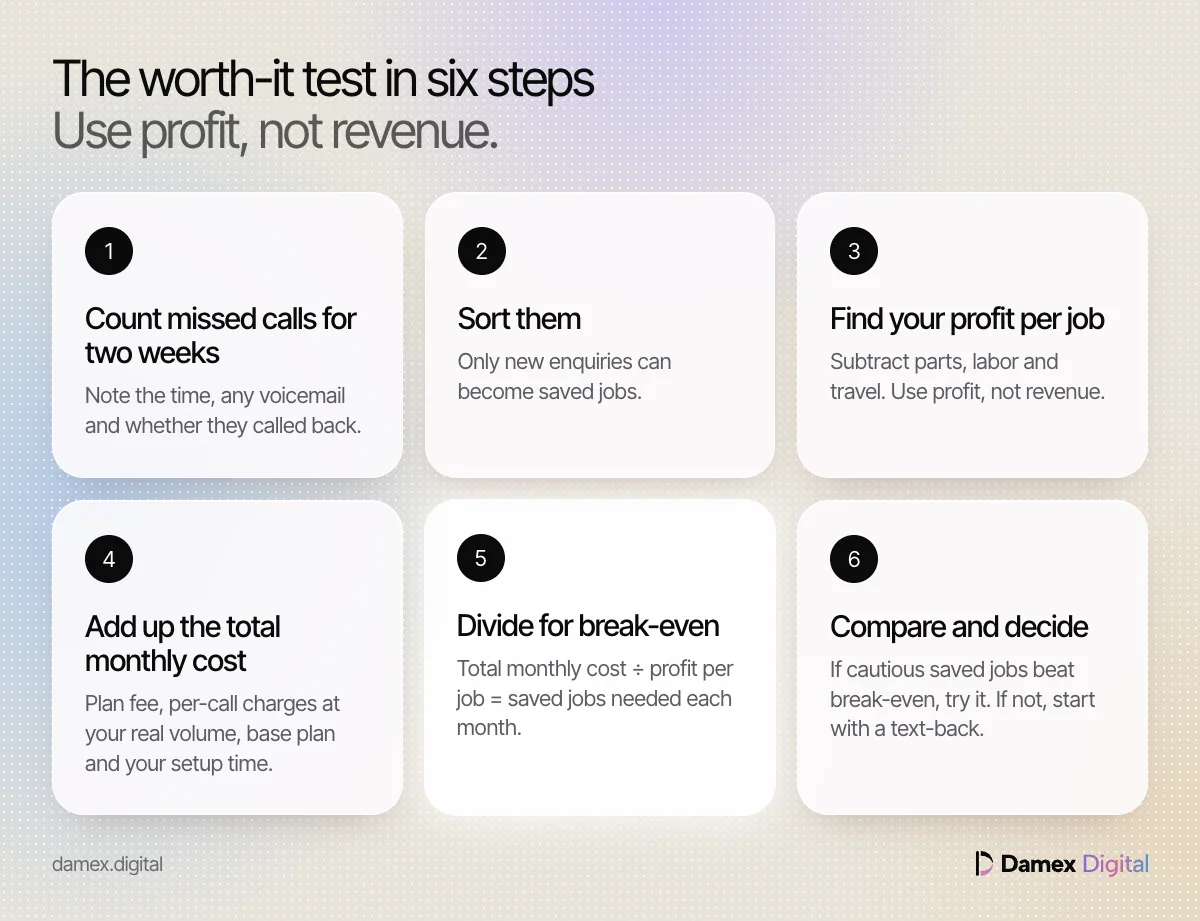
Divide the total monthly cost by the profit on an average job. The answer is how many saved jobs a month you need to break even. Then check your call log to see whether you miss enough real enquiries to save that many.
- Count missed calls for two weeks. Go through your phone’s call log and note every missed call: the time, whether they left a voicemail and whether they called back.
- Sort them. Mark each one as a new enquiry, an existing customer, a supplier, spam or a wrong number. Only new enquiries can become saved jobs.
- Find your profit per job. Take an average job and subtract parts, labor and travel. Use profit, because a $400 job doesn’t put $400 in your pocket.
- Get the total monthly cost. Add the plan fee, any per-call charges at your real volume, any base software plan an add-on needs and your own setup time.
- Work out break-even. Total monthly cost ÷ profit per job = saved jobs needed each month.
- Estimate saved jobs cautiously. Assume only some new enquiries book, such as one in four in our Example below, then prove or disprove it with a 30-day trial.
- Compare and decide. If cautious saved jobs beat break-even, try it. If not, start with a cheaper missed-call text-back.
If break-even is under one job, a single saved job a month covers it. If it’s five, you need to be missing a lot of real enquiries for it to pay. The missed-call calculator runs the lost-revenue side of these sums in your browser.
Is an AI receptionist worth it for an HVAC company? A worked example
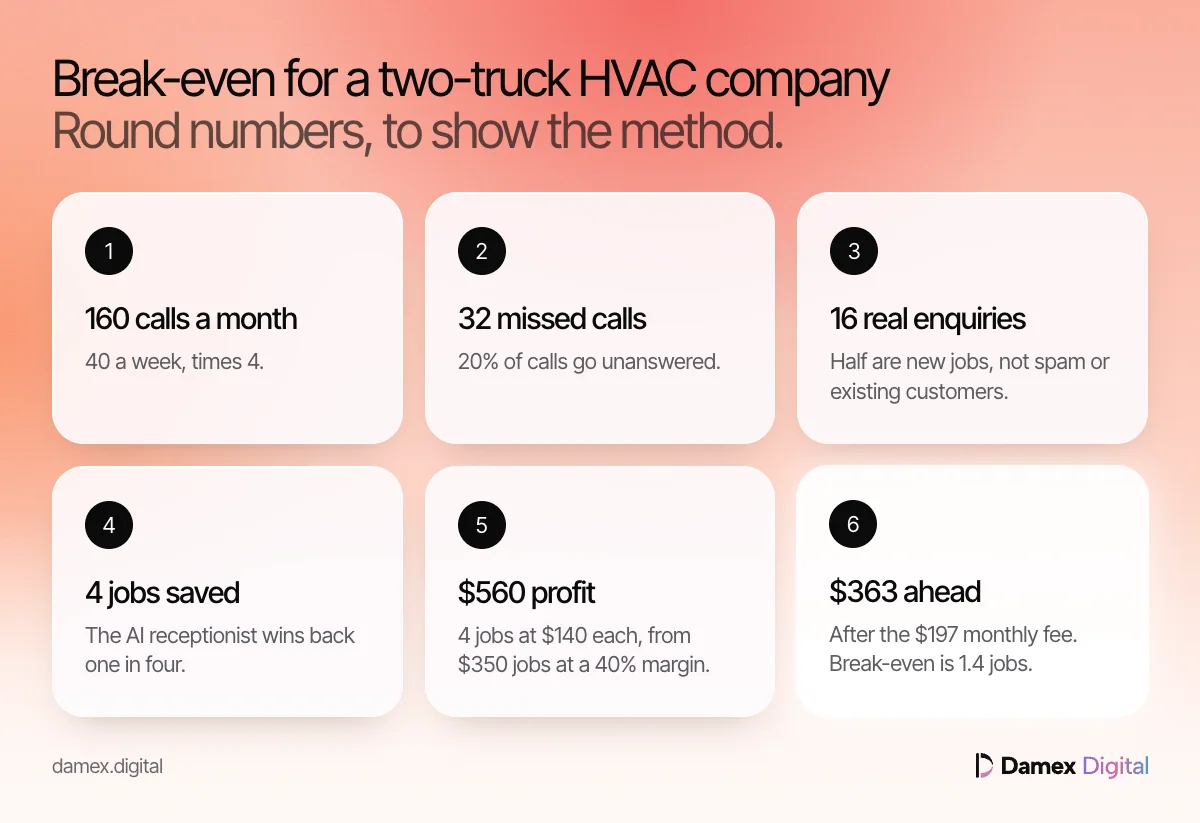
For a busy two-truck HVAC company, it usually is, because a handful of saved repair calls covers the fee. Here’s the full worked example, in round numbers you can swap for your own.
Picture a two-truck HVAC company.
- Calls. It gets 40 a week, or about 160 a month (40 × 4).
- Missed. 20% of calls go unanswered, so 32 missed calls a month (160 × 0.20).
- Real enquiries. Half of those are new jobs rather than spam or existing customers, so 16 a month (32 × 0.5).
- Saved. The AI receptionist wins back one in four of those, so 4 jobs a month (16 × 0.25).
- Job value. The average job is $350, so that’s $1,400 of revenue a month (4 × $350).
- Profit. A 40% gross margin leaves $140 a job, or $560 a month (4 × $140).
- Fee. It costs $197 a month, the price of our Missed calls and AI receptionist service.
Result. The $560 profit minus the $197 fee leaves you $363 a month ahead.
Break-even. $197 ÷ $140 = 1.4 jobs, so in this Example two saved jobs a month cover the fee.
Now change one number. If it wins back only one job a month, that’s $140 of profit against a $197 fee, and you’re $57 a month behind. The whole answer hangs on how many real enquiries you miss and how many come back.
How does this work for each trade?
The method stays the same in every trade, but the inputs change a lot. Emergency trades miss many small calls, roofers miss fewer calls worth far more, and health practices add privacy rules. Each example below uses round numbers to show the method.
Home services: plumbing and roofing
For plumbing companies
Plumbers take a lot of calls, and a per-call plan bills for all of them if every call is forwarded. Say a plumber gets 120 calls a month and forwards them all to a per-call plan priced like Smith.ai’s Pro. That’s $150 for 75 calls plus 45 extra calls × $2.50 = $112.50, so $262.50 a month. It misses 24 calls a month without the tool, 12 are real enquiries, and the AI wins back one in three, so 4 jobs. At $300 a job and a 45% margin, each leaves $135, so $540 a month. Result. $540 minus $262.50 = $277.50 ahead. Break-even is $262.50 ÷ $135 = 1.9 jobs, against 1.5 jobs on a $197 flat fee. Forward only after-hours and overflow calls if your plan bills per call. For the 2 a.m. side of the job, see emergency plumber near me searches.
More for plumbing companies: Plumbing marketing and AI visibility
For roofing companies
An AI receptionist for roofers has to be judged over a year, because the calls bunch up after storms. Say a roofer pays $197 a month, or $2,364 a year (197 × 12). In four storm months it saves 3 repair jobs a month at $800 each and a 35% margin, so $280 profit a job and $840 a month. In the other eight months it saves nothing. Result. 12 saved jobs × $280 = $3,360 a year, so $996 ahead ($3,360 minus $2,364), even though eight months each show a $197 loss. Break-even is $197 ÷ $280 = 0.7 jobs a month. After a storm, homeowners also check whether you’re a real local company, which how roofers get found after a storm covers.
More for roofing companies: Roofing marketing and AI visibility
Health practices: dental and med spa
For dental practices
A dental front desk misses calls at lunch, during check-ins and after hours, and those are often new patients. Say a practice misses 30 calls a month, 8 are new patients wanting a first appointment, and the AI books 3 who keep it. If a first visit leaves $150 profit, that’s $450 a month against a $197 fee, so $253 ahead. Break-even is $197 ÷ $150 = 1.3 new patients. This example leaves out the value of a patient who stays for years, so it’s cautious. Before any tool handles patient details, read is an AI front desk safe for a dental practice.
More for dental practices: Dental marketing and AI visibility
For med spas
An AI receptionist for a med spa mostly catches evening and weekend enquiries about consults, and the math is thin. Say a med spa misses 20 enquiries a month, 6 are real consult requests and the AI books 2. One becomes a treatment that leaves $300 profit. Result. $300 minus $197 = $103 ahead. If neither consult books a treatment, the month is $197 behind. Break-even is $197 ÷ $300 = 0.7 treatments. Keep the assistant to booking and general questions, and check what you can say in ads and replies in med spa advertising rules.
More for med spas: Med spa marketing and AI visibility
What can an AI receptionist do, and what can’t it?
On vendors’ own feature pages, AI receptionists answer calls around the clock, book or take requests, record and summarize calls, and hand callers to a person when needed. None of the pages we read claims it replaces staff judgment. Each describes escalation to a person for anything outside the rules you set.
- Smith.ai lists 24/7 AI call answering, recording, transcription and summaries, lead qualification and call routing, and AI scheduling with tools such as Calendly. Its FAQ says complex calls can be transferred to a live receptionist.
- Jobber says its AI Receptionist answers calls and texts 24/7, books visits, takes requests and escalates to you when needed. It also says it can text back callers who hang up.
- Housecall Pro says CSR AI answers calls and chats, books jobs 24/7 and can send a call to a number you choose. Text answering is listed as Alpha.
What they can’t do comes from the same pages. Jobber says “you control what it can and can’t do”, so it only knows what you set up. The BLS describes receptionists greeting visitors and keeping records, which a phone tool doesn’t do. Our own service gives no medical, legal or emergency advice, and urgent calls go to a person.
An AI receptionist is as good as the answers and rules you give it, and no better.
Will callers actually talk to an AI receptionist?
Most will, if the AI helps quickly and a person is easy to reach. Gartner found half of customers say generative AI makes service easier, but nearly nine in ten want a human option. Callers push back when AI stands between them and a person.
87%
of customers in a 2026 Gartner survey said it is essential for companies using generative AI in customer service to offer an option to reach a human agent.
Source: Gartner, August 2026
50%
of the same 3,566 customers said their interactions are easier when companies use generative AI.
Source: Gartner, August 2026
Gartner adds that customers forced through several failed AI attempts before reaching a person are less likely to use that tool again. When it asked unwilling customers what would change their mind, the most common answer was being able to switch to a human. So say it’s an assistant, keep it short and make “talk to a person” work in one step. The AI receptionist vs answering service comparison covers when a live person is the better first answer.
What hidden costs and setup time should you plan for?
The fee is rarely the whole cost. Plan for per-call charges above your plan, spam and existing customers counting toward a quota, any software plan an add-on sits on, texting registration, and a few hours of your own time to write answers and test them. Vendors’ setup claims range from minutes to dedicated onboarding.
- Usage above the plan. Smith.ai’s Pro plan charges $2.50 for each call beyond 75. A busy month costs more than a quiet one.
- Calls that aren’t leads. Smith.ai says every call its AI answers counts toward the quota by default, with an allowance to remove up to 10% for spam. Known spam numbers are filtered first.
- The base plan. Jobber’s $29 Receptionist is an add-on, so it sits on a Jobber subscription.
- Notice periods. Smith.ai is month-to-month but asks for 30 days’ notice to cancel.
- Setup time. Housecall Pro says “you’re live in minutes” after forwarding calls. Jobber says its Receptionist is ready on day one using data already in your Jobber account. Either way, someone has to check its answers on prices, service area and emergencies.
- Texting. If replies go out by text, a business number needs A2P 10DLC registration first.
Count your own hours too. For example, if you value your time at $100 an hour, two hours a month keeping answers current adds $200 (2 × $100) to the real monthly cost.
What about patient privacy for dental and health practices?
If your practice is a HIPAA covered entity, an AI receptionist that handles patient information is very likely a business associate, and you need a signed business associate agreement before it goes live. HHS names a vendor’s chatbot that does appointment scheduling with patient information as an example of a business associate.
HHS lists dentists and chiropractors among the providers that can be covered entities, but only if they transmit information electronically in connection with a transaction for which HHS has adopted a standard. So whether your practice is covered depends on that test, not on the trade name. HHS’s covered entities page links a decision tool to check.
HHS’s business associate guidance says the agreement is how a covered entity gets “satisfactory assurances” that patient information will be safeguarded. Ask any vendor for one in writing. Keep the assistant to booking, hours and general questions, never clinical advice. Rules vary by state; check with your attorney.
When is an AI receptionist worth it, and when isn’t it?
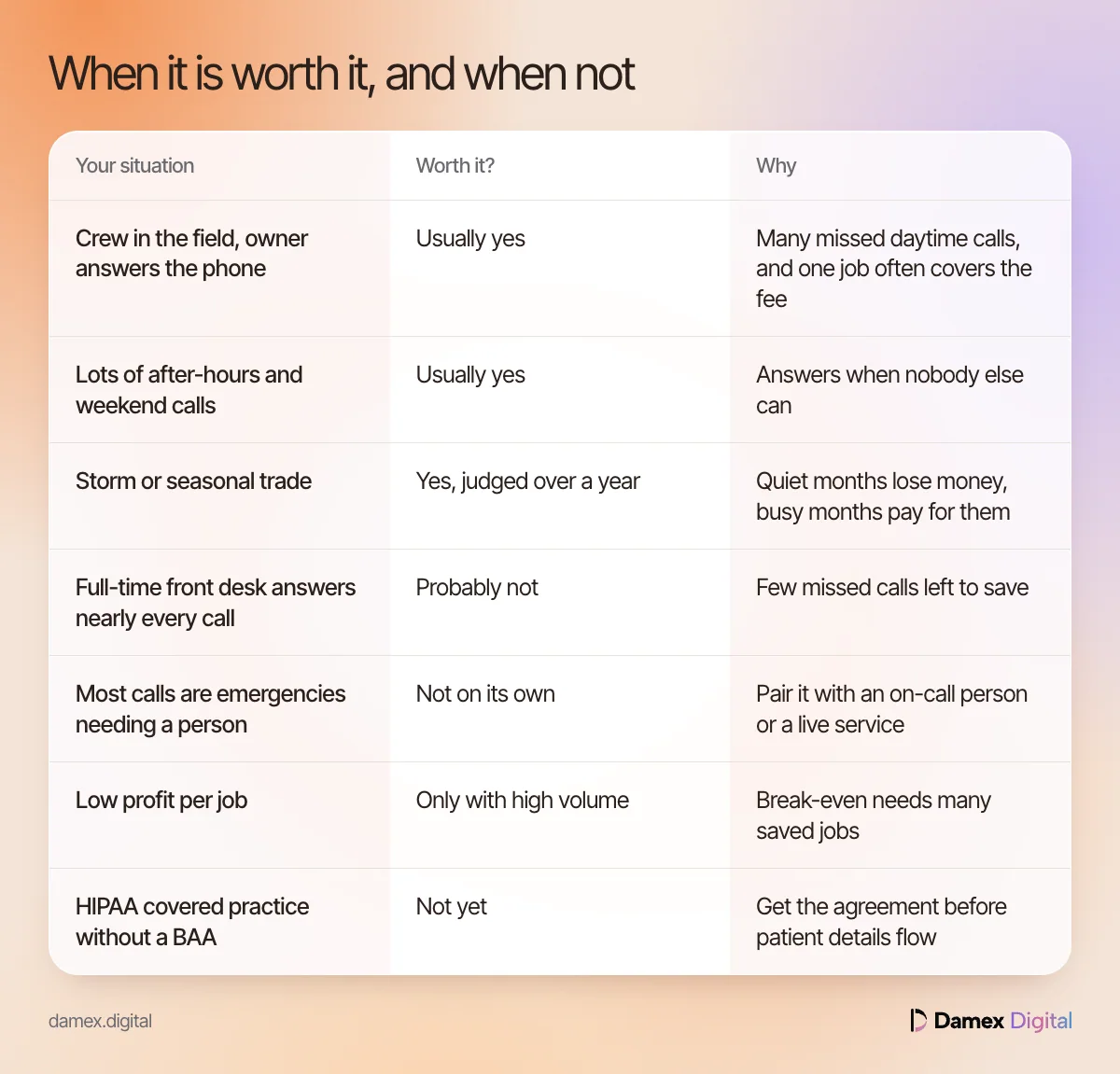
It’s worth it when you miss real enquiries often and each job leaves good profit. It isn’t when you rarely miss calls, when most callers need a person, or when profit per job is so low that break-even needs many saved jobs. This table sums up the common cases.
| Your situation | Worth it? | Why |
|---|---|---|
| Crew in the field, owner answers the phone | Usually yes | Many missed daytime calls, and one job often covers the fee |
| Lots of after-hours and weekend calls | Usually yes | Answers when nobody else can |
| Storm or seasonal trade | Yes, judged over a year | Quiet months lose money, busy months pay for them |
| Full-time front desk answers nearly every call | Probably not | Few missed calls left to save |
| Most calls are emergencies needing a person | Not on its own | Pair it with an on-call person or a live service |
| Low profit per job | Only with high volume | Break-even needs many saved jobs |
| HIPAA covered practice without a BAA | Not yet | Get the agreement before patient details flow |
If you’re paying for leads you then miss, buying leads vs owning your calls explains why fixing the calls you already get comes first.
How do you test an AI receptionist for 30 days?
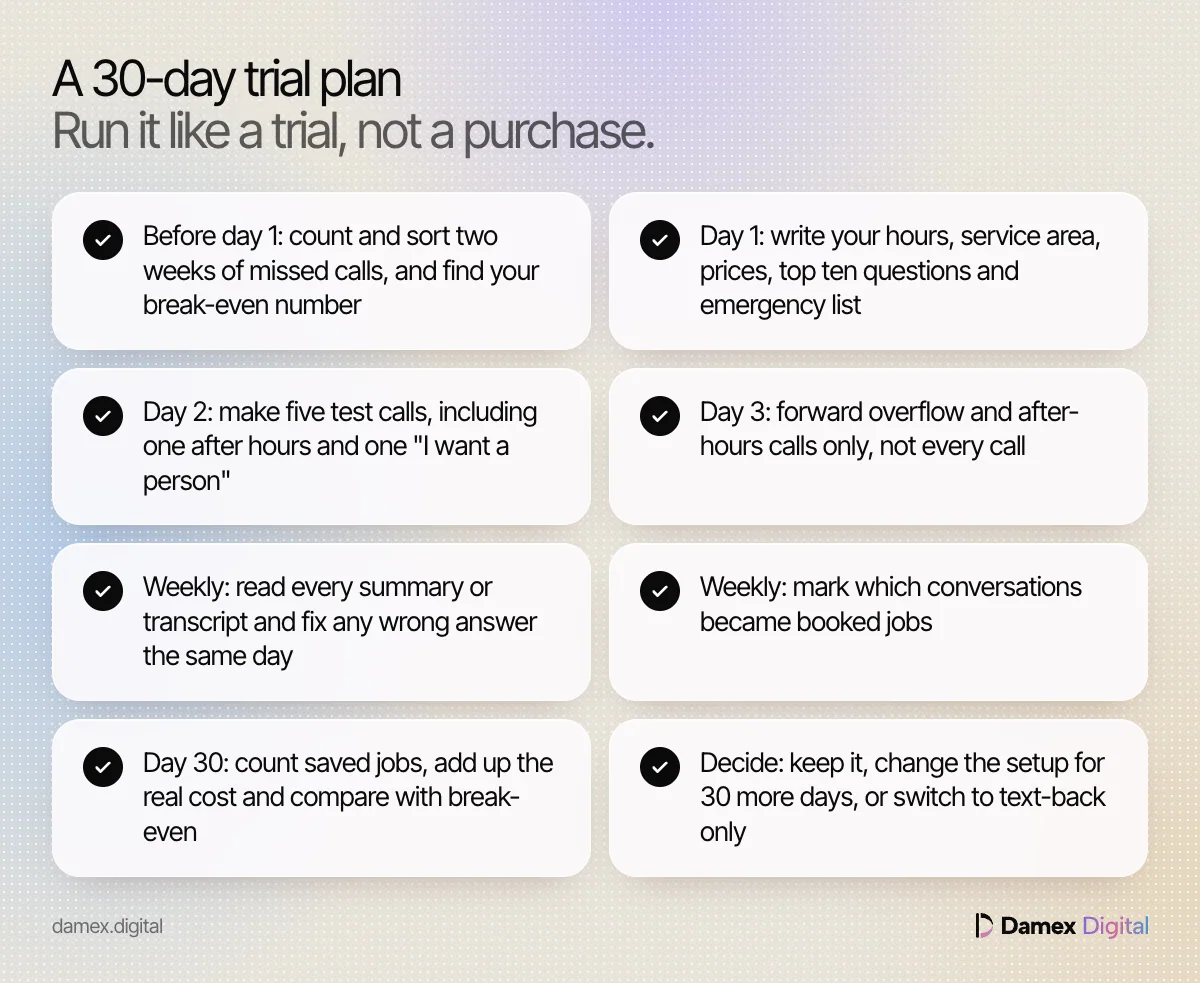
Run it like a trial, not a purchase. Take a two-week baseline first, switch it on for overflow and after-hours calls only, test it yourself, then count saved jobs at day 30 against your break-even number. Most vendors listed above offer a free plan or trial, so the test costs little.
30-day AI receptionist trial plan
- Before day 1: count and sort two weeks of missed calls, and work out your break-even number
- Day 1: write your hours, service area, prices, top ten questions and emergency list
- Day 2: make five test calls, including one after hours, one emergency phrase and one “I want a person”
- Day 3: forward overflow and after-hours calls only, not every call
- Weekly: read every summary or transcript and fix any wrong answer the same day
- Weekly: mark which conversations became booked jobs, and from new or existing customers
- Day 30: count saved jobs, add up the real cost including extra calls, and compare with break-even
- Decide: keep it, change the setup for another 30 days, or switch to text-back only
For the first text missed callers get, use the missed-call text templates.
What are the most common mistakes when deciding?
The most common mistake is counting revenue instead of profit, which makes almost any tool look worth it. Others include treating every missed call as a lost job, ignoring per-call charges, judging a seasonal trade on one month and skipping the baseline. Each one gives you a confident answer built on the wrong number.
- Using revenue, not profit. A $350 job at 40% margin is worth $140 in this test, not $350.
- Counting every missed call as a job. Spam, suppliers and existing customers can’t be saved jobs. Sort the log first.
- Pricing the plan, not the month. Per-call plans charge for every call forwarded. Price your real volume, extra calls included.
- No baseline. Without two weeks of counts before the trial, you can’t tell what changed.
- Judging a seasonal trade on one month. A roofer’s January says nothing about May.
- Hiding the person. With 87% of customers wanting a human option, a loop with no exit costs more than it saves.
- Skipping the agreement. A covered practice needs a business associate agreement before patient details flow.
- Set and forget. Prices, hours and service areas change. Make a test call every month.
How does Damex handle calls and missed calls?
Our team sets up and runs the Missed calls and AI receptionist service, an add-on at $197 a month per location. It answers calls when your team can’t, handles common questions from your own answers and books a call-back or visit. If a call is still missed, it texts the caller back.
The first text stays informational, answers the caller’s request and includes a way to reply STOP. Marketing texts go only to people who gave written consent. Bookings and anything unusual are handed to you with the details, and urgent or sensitive calls go to a person, so someone stays accountable for the job.
You see the numbers this guide asks you to track: missed calls, replies and jobs booked from them. The AI receptionist is an add-on to any Damex package, and packages and add-ons are on the pricing page.
Questions people ask
How much does an AI receptionist cost per month?
Listed prices vary widely. Smith.ai lists a free AI plan with 25 calls a month, a Pro plan at $150 a month for 75 calls and an Enterprise plan at $500 a month for 300 calls. Jobber lists its Receptionist as a $29 a month add-on to a Jobber plan. Damex's service is on the pricing page.
What is the cheapest AI receptionist?
On the pages we checked, Smith.ai's free plan is the lowest listed price, at $0 for 25 calls a month and $3.00 for each call after that. The cheapest plan isn't always the cheapest month, because per-call charges add up when every call counts.
Is there a free AI receptionist for small business, or a free trial?
Smith.ai lists a free AI plan with 25 calls a month. Jobber offers a 14-day free trial of its Grow plan with no card required, and Housecall Pro offers a free trial of CSR AI. Test with your own calls before customers reach it.
How much does Jobber's AI receptionist cost?
Jobber's pricing page lists Receptionist as an add-on at $29 a month, on top of a Jobber plan. The page doesn't say whether calls are capped, so ask before you sign.
How many missed calls make an AI receptionist worth it?
There's no fixed number. Divide the total monthly cost by the profit on an average job to get the saved jobs you need each month, then check your call log to see if that's realistic.
Is an AI receptionist cheaper than hiring a receptionist?
Yes, by a wide margin. The BLS puts median receptionist pay at $38,010 a year in May 2025. A person also greets visitors, handles upset callers and does office work that an AI receptionist doesn't.
What does it cost beyond the monthly fee?
Your time to set it up and keep its answers current, per-call charges above your plan, any base software plan an add-on needs, spam calls that count toward a quota and, for HIPAA covered practices, a signed business associate agreement.
Is an AI receptionist worth it for an HVAC company?
Often, if you miss calls during busy seasons or after hours. In our Example, a two-truck HVAC company that wins back four jobs a month at $140 profit each ends up $363 a month ahead of a $197 fee. Use your own numbers.
Can an AI receptionist work for roofers and other contractors?
Yes, and the test changes. Roofers get fewer calls worth more each, and most of them arrive after storms. Judge the cost over a full year, not one quiet month.
Is an AI receptionist worth it for a med spa?
It can be, if evening and weekend enquiries go unanswered. Check whether your med spa is a HIPAA covered entity first, keep the assistant to booking and general questions, and send clinical questions to a person.
What do owners on Reddit say about AI receptionists?
Reddit threads describe one owner's call volume, prices and setup, so they can't tell you whether it pays for you. Run the break-even test with your own call log instead.
Sources
- U.S. Bureau of Labor Statistics: Receptionists, Occupational Outlook Handbook
- Smith.ai: AI receptionist plans and pricing
- Jobber: AI Receptionist
- Jobber: Pricing
- Housecall Pro: CSR AI
- Gartner: 87% of customers say companies using GenAI for service must provide access to a human agent
- HHS: Business associates frequently asked questions
- HHS: Covered entities and business associates
Cite this post
Badhon, S. U. (2026, October 31). Is an AI receptionist worth it? A break-even test by trade. Damex Digital Blog. https://damex.digital/blog/is-an-ai-receptionist-worth-it/
Founder, Damex Digital
Led product marketing and go-to-market at weDevs, led marketing at Damex and managed a marketing team at Genex. Founded Damex Digital so local service businesses get the daily work of a good marketing team, measured in calls and booked jobs.
Keep reading.More on getting found.
- Calls and leadsAI receptionist for a dental office: is it safe and useful?Oct 31, 2026 · 16 min read
- Calls and leadsAI receptionist vs answering service vs voicemail, comparedOct 31, 2026 · 16 min read
- Calls and leadsPay per lead vs owning your calls: roofing, HVAC and plumbing leadsOct 31, 2026 · 16 min read